
Key Takeaways
- Cold calling software comes in four types: power dialers, parallel dialers, CRMs with built-in dialers, and AI voice agents. The biggest difference between them is whether a human rep or an AI handles the conversation.
- AI Answering is the best fit for AI-led calling and booking, while Orum suits high-volume parallel dialing, PhoneBurner suits one-to-one power dialing, Kixie suits teams that want calling plus SMS, and Close suits teams that want an all-in-one CRM.
- The average cold call success rate is only 2.7% in 2026, so the metric to optimize is cost per meeting, not dials.
Cold calling software connects your reps to live prospects faster by eliminating manual dialing, dead ends, and administrative logging. Modern platforms use automated dialers, call recording, real-time analytics, and voice AI to help reps reach more buyers in less time.
Most outbound sales reps spend only 30% of their day actually talking to prospects. The rest goes toward dialing numbers, leaving voicemails, and typing notes into CRMs.
Cold calling software exists to close that gap. Traditional dialers remove manual dialing and skip voicemails, so reps spend more of their day in live conversations. Newer AI voice agents go a step further by making the calls, qualifying prospects, and booking meetings, leaving reps to handle the conversations that need a human.
What is cold calling?
Cold calling is phoning a prospect who hasn't expressed interest in your product and has no prior relationship with your company. The goal is usually not to close on the first call but to start a conversation, qualify the prospect, and book a meeting. It remains a core outbound channel because it reaches decision-makers directly, in real time, when email and social messages go unanswered.
What is cold calling software?
Cold calling software is a tool that automates the mechanics of outbound phone prospecting so reps (or AI agents) spend their time in conversations, not in dialing. At minimum, it places calls from a contact list, records outcomes, and syncs activity to your CRM.
The category now spans four distinct types of tool, and knowing which type you're buying matters more than any feature checklist:
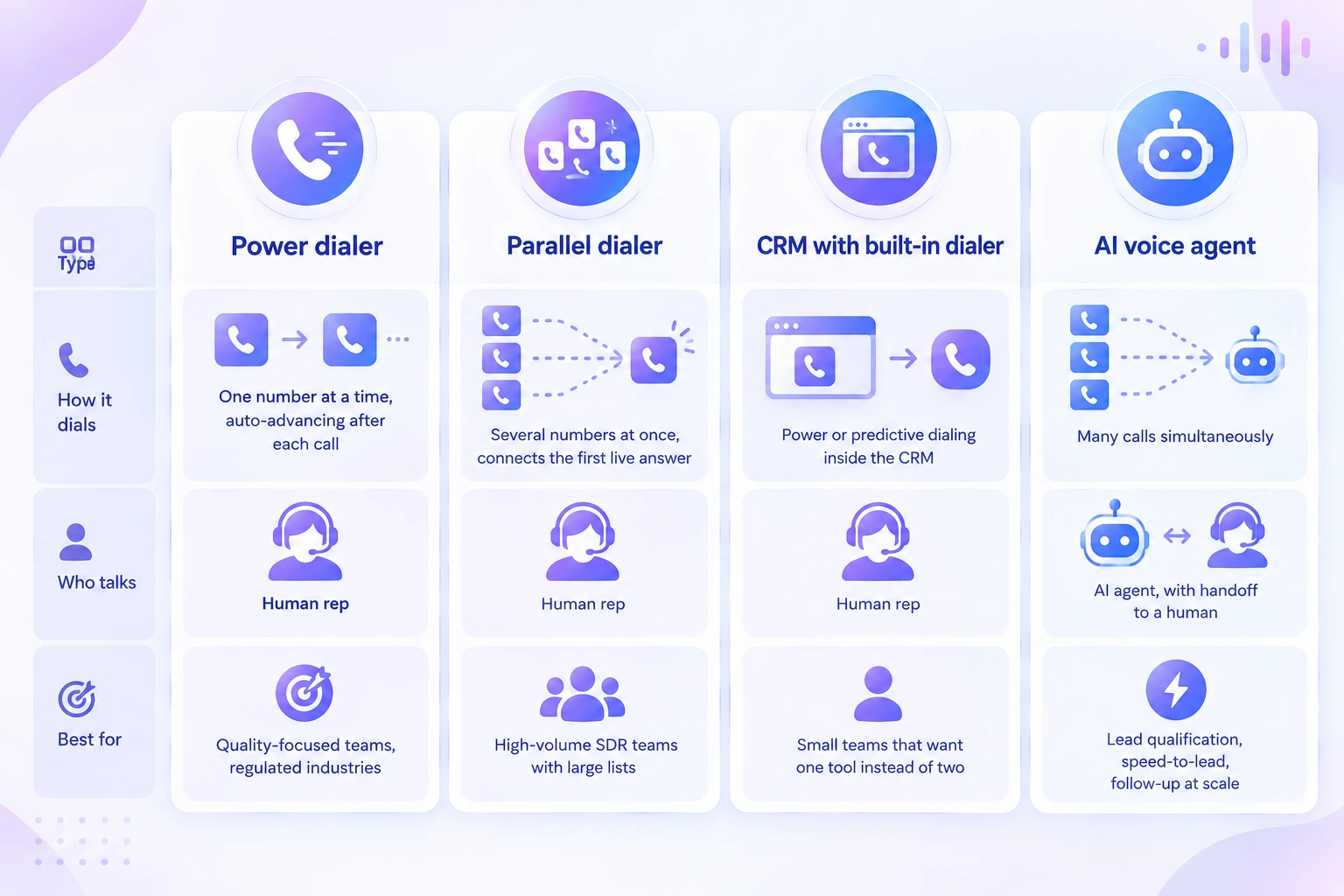
- Power dialers call one number at a time and automatically move to the next contact when each call ends. A human rep handles every conversation, which makes power dialers a good fit for quality-focused teams and regulated industries where each call needs care.
- Parallel dialers call several numbers at once and connect the rep to the first person who answers. Reps get far more conversations per hour, so this approach suits high-volume SDR teams working through large contact lists.
- CRMs with built-in dialers put power or predictive dialing directly inside the CRM, with a human rep on every call. They work well for small teams that would rather manage one tool than pay for and connect two.
- AI voice agents place many calls simultaneously and let AI hold the conversation. The agent qualifies each prospect against your criteria, books meetings straight into your reps' calendars, and hands hot leads to a human the moment they're ready. Instead of making reps dial faster, it takes first-touch calling off their plate entirely, which is why it delivers the lowest cost per meeting of any tool type.
The first three make human reps faster. The fourth changes who does the work, which is why it's reshaping cost per meeting for outbound teams.
How modern cold calling has changed
Cold calling hasn't died; the bottleneck has moved. Three shifts define how outbound teams call in 2026.
Answer rates over dial volume
Volume alone no longer wins. Carriers and phone operating systems now label unfamiliar numbers as spam or screen them automatically, so a team making 100 dials from flagged numbers may reach almost nobody. Number reputation monitoring, local presence, and caller ID rotation have become core features, not extras.
AI-led first conversations
AI voice agents now hold natural two-way conversations, answer basic questions, qualify against custom criteria, and book meetings straight into a calendar. They don't get call reluctance, don't need breaks, and can run hundreds of calls at the same time.
Stricter compliance for AI calls
In February 2024 the FCC ruled that AI-generated voices count as "artificial" under the TCPA, and it explicitly declined to carve out technologies that claim to be the equivalent of a live agent.
That means AI voice calls to consumers and mobile numbers need the same consent as prerecorded calls. Teams using AI agents must build consent and DNC checks into their workflow, and buyers should pick vendors that make that easy.
Key features to look for in cold calling tools
These seven features separate tools that lower cost per meeting from tools that just make reps busier.
Automated dialing
Whether it's a power dialer, a parallel dialer, or an AI agent, the tool should place calls without anyone typing in numbers. Manual dialing is the biggest time sink in a rep's day, so this is the foundation everything else builds on.
Answering machine detection and voicemail drop
The software should recognize voicemails, phone menus, and dead numbers before a rep joins the call. When a call does reach voicemail, a one-click prerecorded message saves the rep from leaving the same message again and again.
Local presence and number health
Displaying a local caller ID gives prospects a reason to pick up, and monitoring your numbers for spam labels keeps them from being blocked. Together, these features have a direct effect on how many calls get answered.
AI qualification and booking
An AI agent can ask your qualifying questions, score each lead, and book meetings straight onto a rep's calendar. This moves repetitive first-touch work off your most expensive people and lets reps focus on qualified conversations.
CRM sync and automatic logging
Every call, outcome, recording, and note should flow into your CRM without manual entry. That saves reps time after every call and keeps your pipeline data accurate.
Recording, transcription, and live coaching
Recorded and transcribed calls, along with AI summaries, make it easy to review what's working. Live monitoring lets managers listen in and coach reps during real calls, which shortens the time it takes new hires to ramp up.
Compliance controls
Look for built-in DNC scrubbing, calling-hour limits, and consent tracking. These protect your team from TCPA and state-law violations, which can carry steep per-call penalties.
How we evaluated these tools
There's no single "best" cold calling tool for every team, so we judged each platform on the factors that most affect cost per meeting, the number that tells you whether outbound calling is paying off. We looked at five criteria:
Dialing method and who does the talking.
We noted whether each tool uses power dialing, parallel dialing, predictive dialing, or AI voice agents, and whether a human rep or an AI handles the conversation. This determines how many conversations a team can have per hour and how much rep time each one costs.
AI capability
We checked for answer detection, call summaries, coaching features, and whether AI can qualify leads and book meetings on its own.
Answer-rate and compliance features
We looked for local presence, number reputation monitoring, DNC scrubbing, calling-hour controls, and consent tracking, since a tool is only useful if calls get answered and stay compliant.
CRM integration
We considered how well each tool connects to popular CRMs and whether calls, outcomes, and notes are logged automatically.
Total cost of ownership
We compared starting prices, then factored in seat minimums, annual contracts, add-ons, and call minutes to reflect what teams actually pay.
Pricing and feature details come from vendors' published plans and independent third-party pricing guides as of mid-2026. Vendors update plans often, so confirm current pricing with a quote before you buy.
Top 5 cold calling software platforms compared
The five platforms below take two different approaches to cold calling. AI Answering uses AI voice agents to handle the calling, qualification, and meeting booking. Orum, PhoneBurner, Kixie PowerCall, and Close CRM are dialers that help human reps reach more prospects in less time. Each review covers how the tool works, its strengths and limitations, and the type of team it suits best.
1. AI Answering: best overall for AI-powered outbound
AI Answering replaces the most repetitive and expensive part of cold calling, the first-touch conversation, with AI voice agents. Other tools make a rep 20% faster; AI Answering takes qualification and booking off the rep's plate entirely, so your team spends its day closing instead of chasing.
AI Answering offers three plans. Starter costs $450 per month and includes 300 AI calls and 300 appointments, Unlimited costs $997 per month for unlimited calls and appointments, and Pay As You Go charges $1.50 per AI call. Live human agent support is available on every plan for $3.50 per call.
Key features:
- Conversational AI voice agents: hold natural two-way conversations, answer common questions, and respond to what the prospect says instead of reading a fixed script.
- Custom lead qualification: asks your qualifying questions (such as budget, timeline, role, and need) and scores each lead against your criteria.
- Automatic meeting booking: schedules qualified prospects directly onto a rep's calendar during the call.
- Live handoff to reps: transfers interested prospects to a human rep in real time when a conversation needs one.
Pros:
- Outbound capacity grows without hiring, since AI agents can run many calls at once.
- New leads get a call quickly, which raises the odds of reaching and qualifying them.
- Every lead is qualified the same way, so reps get consistent, comparable information.
- Reps start their day with booked meetings instead of a list of numbers to dial.
Cons:
- Takes upfront work to define qualifying questions, test scripts, and set handoff rules.
- AI Answering currently supports English and Spanish, and human agent support costs extra per call.
2. Orum: best for enterprise parallel dialing
Orum is a premium parallel dialer built for phone-first SDR teams. Its Launch plan runs about $250 per user per month on annual billing, with 5 parallel dials and a 3-seat minimum, while the Ascend tier adds 10 parallel lines at custom pricing. Orum now gates its public pricing, and in July 2026 it acquired Scout AI to strengthen call coaching.
Key features:
- Parallel dialing: calls up to 5 numbers at once on Launch, or 10 on Ascend, and connects the rep to the first live answer.
- AI answer detection: filters out voicemails, phone trees, and dead lines before the rep joins the call.
- Virtual salesfloor: lets managers listen in on live calls and coach reps in real time, even on remote teams.
- AI call summaries and scorecards: generates notes and performance scores after each call and syncs them to your CRM.
Pros:
- Reps have far more live conversations per hour than they could by dialing one number at a time.
- Reps spend their time talking to people instead of waiting through voicemails and phone menus.
- New reps ramp faster because managers can coach them during real calls.
- Reps spend less time on admin, since call notes and logging happen automatically.
Cons:
- Annual contracts and a 3-seat minimum make it a costly commitment for small teams.
- You'll still need a separate CRM and sales engagement tools, which adds to the total cost.
3. PhoneBurner: best for one-to-one power dialing
PhoneBurner is a single-line power dialer known for deliverability and TCPA-conscious design. Plans cost $140, $165, and $183 per user per month billed annually, and transcription, the AI note-taker, and SMS are limited to the top Premium tier.
Key features:
- Power dialer with unlimited calling: dials one contact at a time and advances automatically, with no per-minute charges on any plan.
- One-click voicemail drop: leaves a prerecorded message and moves to the next call instantly.
- Number reputation tools: the ARMOR add-on monitors and protects caller IDs from spam labels.
- CRM integrations: connects with major CRMs and logs calls, outcomes, and notes automatically.
Pros:
- Costs are predictable, thanks to published pricing and unlimited calling.
- Prospects never hear a delay when they pick up, because each call connects one-to-one.
- More calls get answered when your numbers stay clear of spam labels.
- Solo callers and small teams can start without meeting a seat minimum.
Cons:
- Reps reach fewer people per hour than they would with a parallel dialer, since no plan offers parallel dialing.
- Getting AI features like transcription and note-taking means paying for the top Premium tier.
4. Kixie PowerCall: best for CRM-connected calling and texting
Kixie combines calling, SMS, and a multi-line dialer that calls up to 10 numbers in parallel and connects the rep to the first live person. Pricing is quote-only; vendor quotes put seats at roughly $95 to $215 per user per month, with add-ons like ConnectionBoost and conversation intelligence priced separately.
Key features:
- Multi-line dialer: calls up to 10 numbers at once and connects the rep to the first live answer.
- Native CRM integrations: works inside HubSpot, Salesforce, and Zoho, with automatic call logging.
- Business SMS and voicemail drop: sends texts and prerecorded voicemails from the same platform.
- Local presence: ConnectionBoost displays local caller IDs to lift answer rates (paid add-on).
Pros:
- Reps get more conversations per hour by dialing several prospects at once.
- Reps stay inside the CRM they already use, so there's no tab-switching or manual data entry.
- Prospects who don't answer can be reached by text, all from one tool.
- Unlimited US and Canada minutes keep calling costs from climbing with volume.
Cons:
- Pricing is quote-only, which makes budgeting and comparison harder.
- Add-ons like ConnectionBoost and conversation intelligence push the real per-seat cost well above the base price.
5. Close CRM: best all-in-one CRM with a built-in dialer
Close is a sales CRM with native calling, SMS, and email sequences, which removes the need for a separate dialer. The Power Dialer starts on the Growth plan at $99 per user per month annually, and the Predictive Dialer on Scale at $139. Call minutes are billed on top by usage.
Key features:
- Built-in CRM: manages leads, pipeline, and deals in the same platform as calling.
- Power and predictive dialers: Power Dialer on Growth, Predictive Dialer on Scale.
- Multichannel outreach: combines calling, SMS, and email sequences in one workflow.
- AI sales agent: helps with follow-ups and admin from the Growth plan up.
Pros:
- One subscription replaces both a CRM and a dialer, which lowers tool costs and removes sync problems.
- Transparent pricing makes it easy to budget and compare.
- Reps see a lead's full history while they're on the call, so conversations are better informed.
- A 14-day free trial lets you test it with real calls before committing.
Cons:
- Reps have fewer conversations per hour than with parallel dialers like Orum or Kixie, since Close offers no parallel dialing.
- Call minutes are billed separately, so costs rise quickly for heavy callers.
Best cold calling software by use case
Different industries use the phone differently. Here's where each tool fits best.
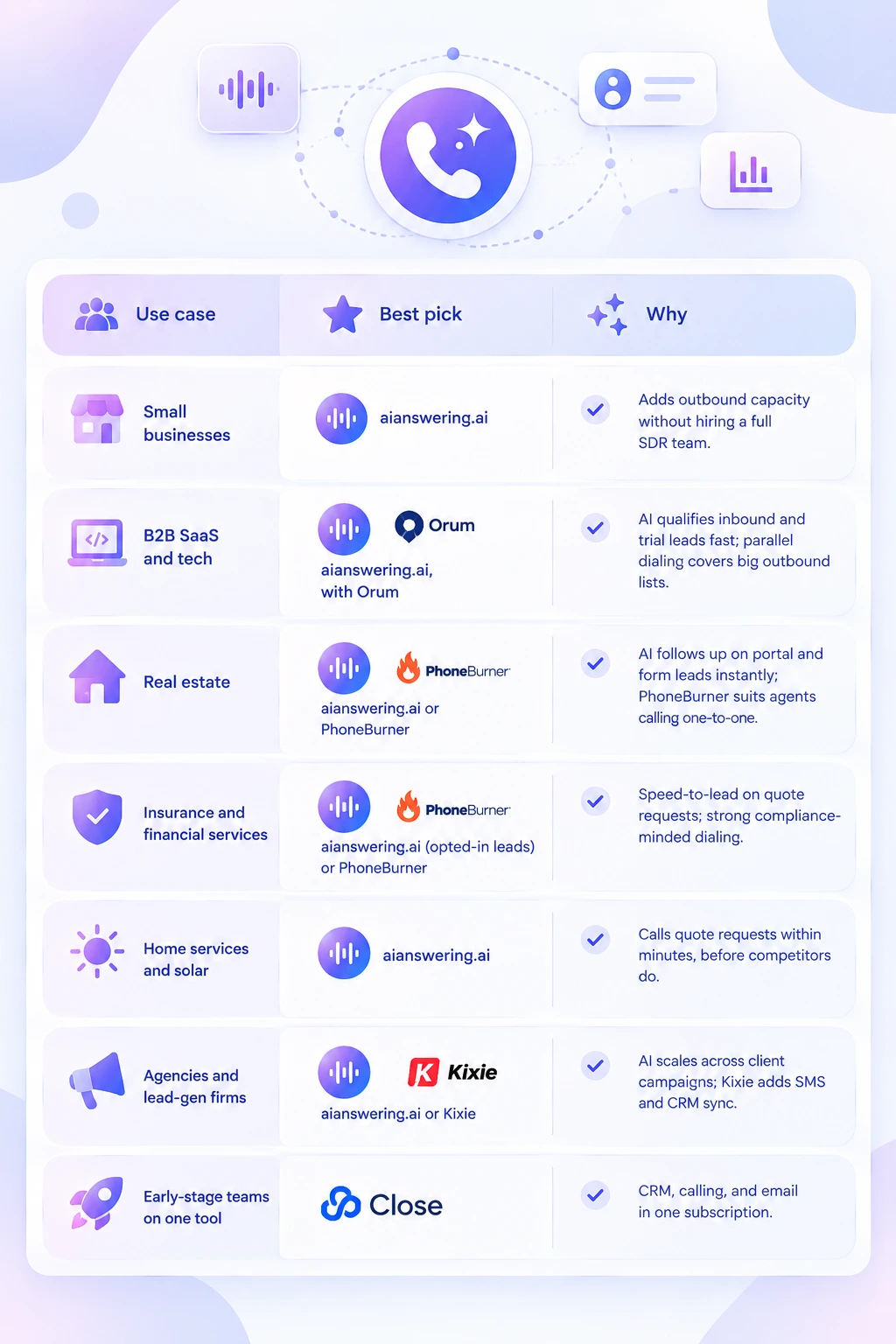
Small businesses
AI Answering is the strongest fit for small businesses because it adds outbound calling capacity without the cost of hiring a full SDR team.
B2B SaaS and tech
AI Answering works well for qualifying inbound and free-trial leads quickly. Larger SDR teams working big outbound lists can pair it with Orum for high-volume parallel dialing.
Real estate
AI Answering can follow up on the portal and website leads the moment they come in. Agents who prefer to make every call personally will find PhoneBurner's one-to-one power dialing a good match.
Insurance and financial services
For opted-in quote requests, AI Answering delivers the speed-to-lead these industries depend on. PhoneBurner is a solid choice for teams that want compliance-minded, rep-led dialing.
Home services and solar
AI Answering fits best here because it can call quote requests within minutes, before competitors reach the same homeowner.
Agencies and lead-generation firms
AI Answering scales easily across multiple client campaigns. Kixie is a good alternative for agencies that want SMS alongside calling, plus tight CRM sync.
Early-stage teams that want one tool
Close CRM combines a CRM, calling, and email in a single subscription, which keeps the stack simple while the team is small.
AI agents vs. human reps: when to use each
The smartest outbound teams don't pick one or the other. They let AI agents handle volume and repetition, and save human reps for the moments that need judgment.
In practice, AI Answering takes the top of the funnel (dialing, first conversations, qualification, booking) and your reps take everything from the first meeting onward. That split is how teams grow pipeline without growing headcount.
How to choose the right cold calling software
Pick the tool by the cost per meeting it will produce for your team, not by its feature list. These five steps get you there.
Calculate your current cost per meeting.
Add rep salaries, tools, data, and phone costs for a month, then divide by qualified meetings booked. This is the baseline every vendor has to beat.
Decide who should make the first touch.
If most calls are qualification or follow-up, an AI voice agent like AI Answering removes that work from reps entirely. If your deals need a skilled human from the first second, choose a power or parallel dialer.
Match dialing method to list size and market.
Parallel dialers need large lists and tolerate occasional connection lag. Power dialers suit smaller, high-value lists. AI agents fit lists where speed and consistency matter more than a rep's personal touch.
Check compliance for your contact type.
Business landlines, consumer mobiles, and opted-in leads carry different rules. AI and prerecorded voices need consent for calls to mobile and residential numbers, so confirm the vendor supports DNC scrubbing, calling-hour limits, and consent records.
Price the full stack, not the seat.
Add parallel-line tiers, AI add-ons, number reputation tools, call minutes, and annual commitments. A $99 seat can cost double once usage and add-ons land.
Then run a two-week pilot on one list, and compare meetings booked and cost per meeting against your baseline.
If your goal is more qualified meetings without hiring more reps, start with AI Answering. Run it on one lead list for two weeks, compare cost per meeting against your current setup, and let the numbers decide.
How to get your cold calls answered
The best software in the world can't book a meeting if nobody picks it up. Carriers and phone apps now flag unfamiliar numbers as "Spam Likely" or screen them silently, so protecting your caller ID is as important as the tool itself.
Register your numbers.
Submit your outbound numbers to the major carrier analytics providers (Hiya, First Orion, and TNS) through the free registry many carriers use, so your calls are less likely to be mislabeled.
Make sure calls are STIR/SHAKEN-attested.
This caller ID authentication framework is required for US carriers. Calls with the highest attestation level are trusted more, so confirm your provider signs your calls properly.
Use a branded or local caller ID.
A recognizable business name or local area code gives prospects a reason to answer.
Pace your numbers.
Very high daily volume from a single number is a common trigger for spam labels. Spread calls across a healthy pool of numbers.
Call warmer lists.
Leads who opted in, requested information, or engaged recently answer far more often. This is exactly where AI agents like AI Answering deliver the fastest results.
Cold calling compliance checklist
Compliance protects your brand and your budget: TCPA violations carry statutory damages per call. Use this checklist before any campaign goes live. It's a starting point, not legal advice, so confirm requirements with counsel for every region you call.
Scrub against Do Not Call lists.
Check the National DNC Registry, applicable state lists, and your own internal DNC list before every campaign.
Respect calling hours.
Federal rules limit telemarketing calls to 8 a.m.–9 p.m. in the recipient's local time, and some states set narrower windows.
Get consent for AI and prerecorded voices.
AI-generated voices are treated as artificial voices under the TCPA, so calls to mobile and residential numbers need prior consent, and written consent for marketing calls.
Identify yourself.
State your name and company at the start of every call, and honor opt-out requests immediately.
Keep records.
Store consent records, call recordings (where legal), and DNC requests so you can prove compliance.
Check state and international rules.
Several states have their own telemarketing laws, and calling outside the US brings different rules again.
How to roll out cold calling software in 30 days
A structured rollout gets you to reliable results faster than switching everything on at once.
- Week 1: Set up and connect. Integrate your CRM and calendar, register your numbers, load a clean list, and set up DNC scrubbing. For AI Answering, define your qualifying questions and booking rules.
- Week 2: Pilot on one list. Run a single, well-defined segment, ideally opted-in or inbound leads. Review recordings daily and refine scripts, questions, and handoff rules.
- Week 3: Compare against your baseline. Measure connect rate, meeting rate, and cost per meeting against your pre-pilot numbers.
- Week 4: Scale what works. Expand to more lists and campaigns, and define which conversations the AI hands to reps and which it completes on its own.
Final Thoughts
Cold calling still works, but only when your team spends its time in real conversations instead of waiting through rings, voicemails, and phone menus. The right cold calling software closes that gap. Power and parallel dialers help reps reach more people per hour, CRMs with built-in dialers keep everything in one place, and AI voice agents take first-touch calls off your reps' plates entirely. Whichever direction you choose, judge every tool by the same number: how much it costs you to book each qualified meeting.
At AI Answering, we built our AI voice agents to bring that number down. They call your leads, qualify them against your criteria, book meetings straight onto your team's calendar, and hand hot prospects to a rep the moment they're ready, so your salespeople start every day with conversations worth having.
Ready to fill your calendar without adding headcount? Book a consultation of AI Answering and see how many more meetings your team could be booking.