
Contact center automation is software that handles routine customer requests and the admin work around them, such as routing, call notes, and CRM updates. Agents then spend their time on contacts that need a person.
It only pays off when it resolves requests and gives customers an easy way to reach a person. This guide covers how it works, what to automate first, what it costs, and which metrics to track.
What is contact center automation?
Contact center automation is the use of AI and rule-based software to complete customer service tasks that agents would otherwise do by hand. That includes answering routine questions, routing contacts, verifying identity, writing call summaries, and updating the CRM.
It covers every channel a contact center runs: phone, chat, email, SMS, messaging apps, and social. It also covers work customers never see, like quality scoring and staff scheduling.
Rule-based vs AI-powered automation
Most contact centers run a mix of two kinds of automation. Rule-based tools follow fixed scripts, while AI tools interpret what a customer means and decide what to do next.
Rule-based tools are cheap and predictable. AI tools handle the messy middle, where customers explain things in their own words.
Contact center automation vs call center automation
Call center automation covers phone calls only, while contact center automation covers every channel. In other words, call center automation is a subset of contact center automation.
The distinction matters when you pick tools. If customers start in chat and finish on the phone, both channels need to share the same history.
How contact center automation works
Most automated interactions follow the same five steps, whatever the channel or vendor.
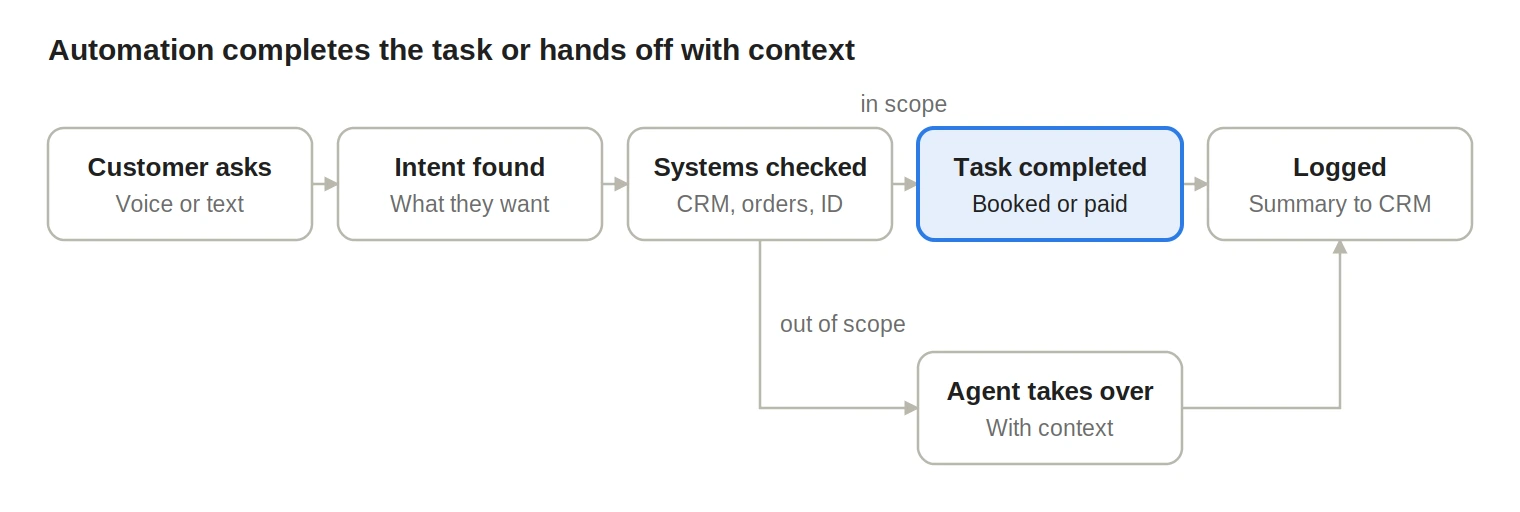
Requests automation can finish and stay automated; everything else reaches an agent with the details attached.
- The customer gets in touch. On the phone, speech recognition turns their words into text in real time. In chat or email, the text arrives as written.
- The system works out intent. AI identifies what the customer wants, such as "reschedule my appointment" or "where is my order."
- It checks connected systems. The software looks up the customer in the CRM, order system, calendar, or billing platform. It verifies identity where needed.
- It completes the task or hands off. It books the slot, sends the tracking link, or takes the payment. If the request falls outside its scope, it transfers to an agent with the transcript attached.
- It logs everything. The interaction is summarized, tagged with a contact reason, and written back to the CRM.
Here is a simple example. A patient calls a clinic at 9 p.m. to move an appointment.
The voice agent confirms their date of birth, offers three open slots, books one, and texts a confirmation. Nobody on staff touches it, and the front desk sees the change in the morning.
The four layers of contact center automation
Contact center automation works on four layers, and two of them are invisible to customers. Many teams get their safest early wins from those hidden layers.
Customer-facing automation
Customer-facing automation handles requests directly, with no agent involved. It covers self-service answers, bookings, payments, order status, and identity checks.
Example: a voice agent resets a password with no queue.
Agent-facing automation
Agent-facing automation helps agents during live contacts. It surfaces knowledge suggestions, customer history, next-step prompts, and live transcription.
Example: the return policy pops up when a caller mentions a refund.
Back-office automation
Back-office automation handles the work agents do after a contact ends. It covers call summaries, disposition codes, CRM updates, tickets, and follow-up emails.
Example: a summary is ready to approve the moment the call ends.
Management automation
Management automation helps supervisors, QA teams, and planners. It covers quality scoring, volume forecasting, scheduling, and queue alerts.
Example: QA reviews every call instead of a small random sample.
Back-office automation is often the lowest-risk starting point. Nothing changes for customers, and the contact-reason data it produces shows you what to automate on the front line next.
Technologies behind contact center automation
No single tool does everything, so most contact centers combine several of these.
- Conversational IVR: lets callers say why they are calling instead of pressing keys. It sits at the phone front door.
- AI voice agents: complete whole tasks over the phone. They fit after-hours calls, scheduling, and payments.
- AI chat agents: resolve requests in web chat, apps, SMS, and WhatsApp. They handle digital self-service.
- Intelligent routing and ACD: sends each contact to the right queue or agent by intent, skill, language, and priority. It applies to every inbound contact.
- Robotic process automation (RPA): moves data between systems using fixed rules. It fits ticket creation, CRM updates, and refunds.
- Agent assist: suggests answers and next steps during live contacts. It helps most in complex or regulated conversations.
- Speech and text analytics: transcribe and tag every interaction by topic and sentiment. They support QA, trend spotting, and coaching.
- Workforce management (WFM): forecasts contact volume and builds schedules for staffing and shift planning.
- Generative AI summarization: writes call notes and drafts follow-up emails, which cuts after-call work.
For voice, test response speed and interruption handling before you buy. A voice agent that pauses too long gets talked over, and callers give up.
Benefits of contact center automation
The main benefits are faster answers, lower cost per contact, and agents freed from repetitive work. Each one depends on the automation actually resolving requests.
- Round-the-clock coverage: routine requests get handled at night, on weekends, and on holidays without extra shifts.
- Shorter queues for hard problems: every routine request handled by software frees agent time for complex cases.
- Lower operating costs: in its March 2025 press release, Gartner predicts agentic AI will resolve 80% of common customer service issues by 2029. Gartner expects that to cut operational costs by 30%.
- Less after-call work: auto-generated summaries and CRM updates remove manual typing after every call.
- Consistent answers: customers get the same policy answer at 2 a.m. as at noon. That consistency also helps with compliance audits.
- Cleaner data: every automated interaction is tagged, so you see exactly why customers get in touch.
- Easier peaks: seasonal spikes, outages, and product launches no longer mean emergency overtime.
Drawbacks and risks
The biggest risk is customers feeling blocked from a person. In the Gartner survey of 5,728 customers published July 2024, 64% said they would prefer companies didn't use AI for customer service.
The same survey found 53% would consider switching to a competitor. Their top concern was difficulty reaching an agent.
- Dead ends: customers loop through the bot with no way out. Always offer a path to a person.
- Wrong answers: generative AI invents a policy or price. Limit answers to an approved knowledge base and test with real transcripts.
- Wrong actions: a refund or cancellation goes through by mistake. Confirm before any irreversible step and keep risky actions human-only at first.
- Integration gaps: the bot cannot see orders or billing, so it cannot finish tasks. Budget time and money for integrations up front.
- Harder agent workload: agents only get difficult, emotional contacts. Adjust training, coaching, and break schedules.
- Over-cutting staff: service drops after headcount cuts. Plan for reallocation before reduction.
That last risk is common. Gartner's June 2025 prediction says 50% of organizations that planned major customer service workforce cuts will abandon those plans by 2027.
What to automate first
Automate contacts that are high in volume and low in risk first, then expand as the system proves reliable. Start by pulling 90 days of contact reasons and ranking your top 20 by volume.
Next, score each reason on how much damage a mistake would cause. Then place it in this matrix.
A task is ready for automation when three things are true:
- The policy answer is clear and written down.
- The data needed sits in a system the automation can reach.
- You can tell whether it succeeded, such as a booking made or a payment taken.
What to leave with people for now
Some conversations need judgment and empathy, and customers expect a person. Keep these human-led until your automation has a long track record.
- Complaints and emotional calls, such as bereavement or financial hardship
- Retention conversations where an agent can make an offer
- Disputes where policy needs interpretation
- Customers flagged as vulnerable
- High-value actions that cannot be undone
Contact center automation use cases by industry
The best use cases look similar across industries: frequent, well-defined, and easy to verify.
- Healthcare: appointment booking and reminders, refill requests, insurance intake
- Banking and financial services: balance questions, card freezes, payment reminders, identity verification
- Insurance: first notice of loss intake, policy questions, claim status updates
- Retail and e-commerce: order tracking, returns, exchanges, delivery changes
- Telecom: outage alerts, plan changes, basic troubleshooting, bill explanations
- Home services: booking, technician arrival updates, quote requests, after-hours emergency triage
- Travel and hospitality: rebooking, reservation changes, check-in details
- BPOs and outsourcers: overflow coverage, multilingual first-line support, after-hours lines
A 90-day implementation plan
A focused rollout takes about 90 days from baseline to first expansion. Complex integrations with older systems can stretch that.
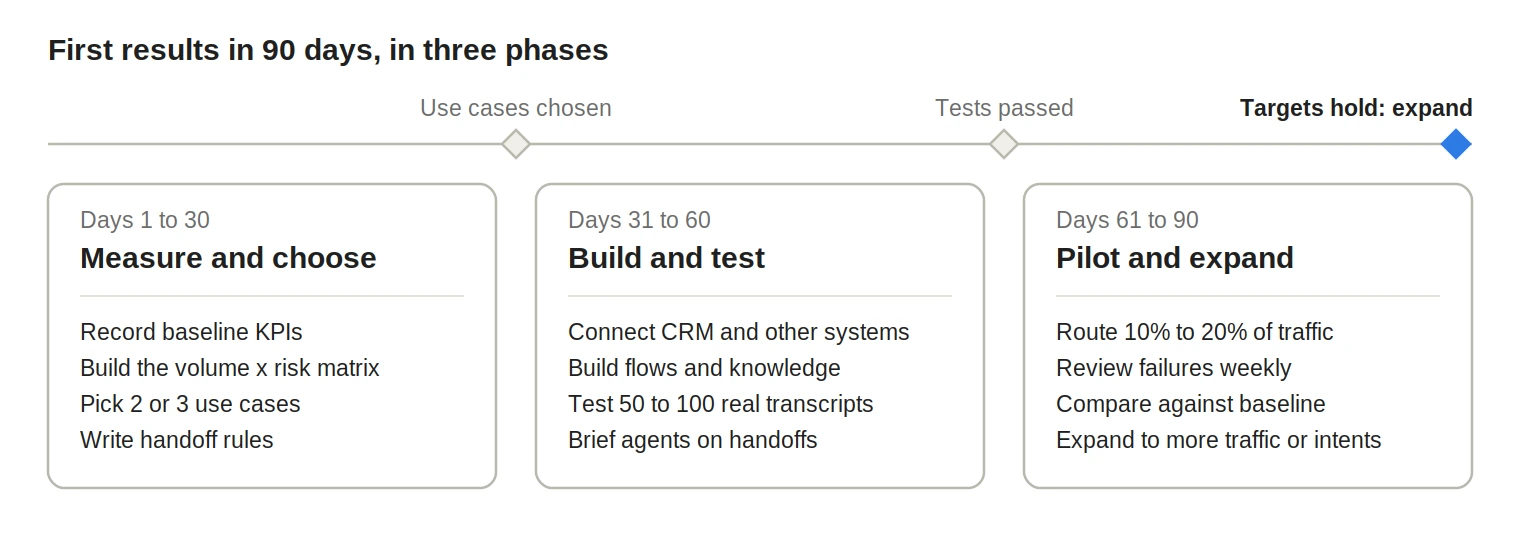
Each phase ends with a gate; move on only when it is met.
Days 1 to 30: Measure and choose
- Record current KPIs: average handle time, first contact resolution, CSAT, cost per contact, and abandonment rate.
- Build the volume and risk matrix from your contact reasons.
- Pick two or three use cases from the "automate first" box.
- List every system the automation must read from or write to.
- Write your handoff rules before building anything.
Days 31 to 60: Build and test
- Connect the CRM, scheduling, billing, or order systems.
- Build the conversation flows and knowledge sources.
- Test with 50 to 100 real transcripts, including angry, confused, and off-topic customers.
- Brief agents on what changes for them and how handoffs will arrive.
Days 61 to 90: Pilot and expand
- Send 10% to 20% of traffic for the chosen intents to the automation.
- Review failed and escalated conversations every week.
- Compare results against your day-one baseline.
- Expand to full traffic, or to the next use case, once targets hold for several weeks.
How to design the AI-to-human handoff
A good handoff gets the customer to the right person with full context, so they never repeat themselves. Write these rules down before launch instead of relying on vendor defaults.
- Triggers: the customer asks for a person, two attempts fail, frustration is detected, or a high-risk topic comes up.
- Context sent to the agent: the transcript, detected intent, identity verification status, steps already tried, and key account details.
- Routing: send the contact to the right skill group, such as billing or claims, instead of a general queue.
- No dead ends: saying "agent" or pressing 0 always works. After hours, offer a scheduled callback.
- Clear messaging: tell the customer what happens next, such as "I'm connecting you to billing, and they'll see everything we covered."
Contact center automation best practices
The best results come from starting small, measuring resolution, and keeping a person within easy reach. These five practices matter most.
- Start with high-volume, low-risk requests: pick two or three contact reasons where a mistake costs little, like order status or appointment booking. Use the matrix in "What to automate first" to choose them.
- Always offer a way to reach a person: saying "agent" or pressing 0 should work at every step. In Gartner's July 2024 survey, difficulty reaching an agent was customers' top concern about AI in service.
- Pass full context on every handoff: send the transcript, intent, verification status, and steps already tried. Customers should never have to repeat themselves after a transfer.
- Measure resolution alongside containment: a contact kept away from agents only counts as a success if the problem got solved. Track repeat contacts within 7 days to catch false wins.
- Review failures every week: read escalated and abandoned conversations weekly and list the top causes. Then update flows, knowledge, or handoff rules to fix them.
Metrics that show contact center automation is working
Track resolution next to containment, because automation can keep customers away from agents without solving anything. Segment every metric by intent and review it weekly.
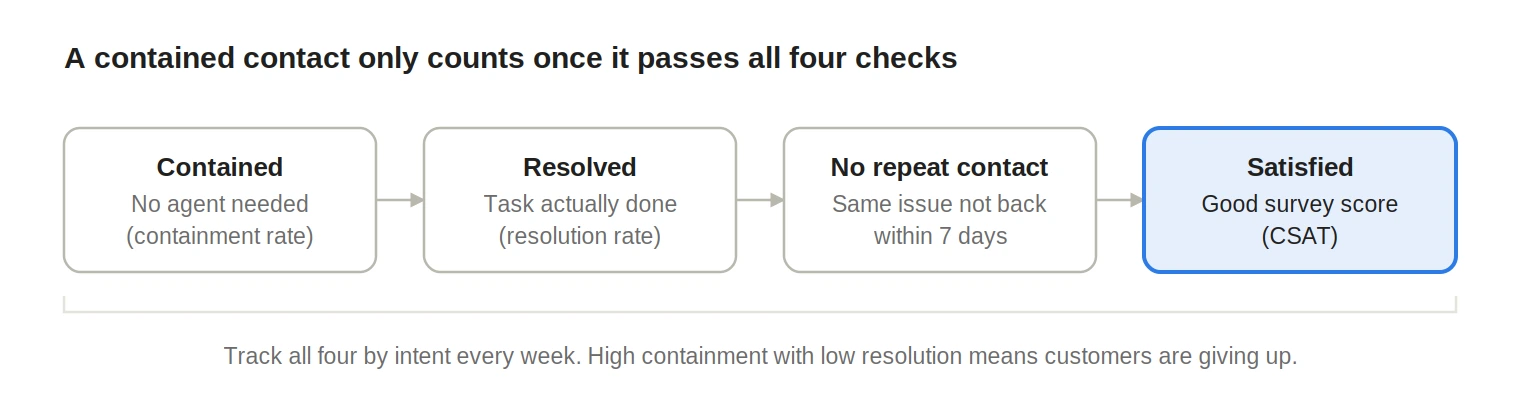
Each check narrows the group of contacts you can count as a real success.
How much does contact center automation cost?
Costs vary widely by channel, volume, and vendor, so compare options by cost per resolved contact. Measure that against your fully loaded cost for an agent-handled contact.
Budget for costs outside the license too. These include integration work, telephony, knowledge base cleanup, and staff time for weekly tuning.
A worked ROI example
The numbers below are illustrative, so swap in your own.
- A contact center takes 20,000 calls a month, and 8,000 are order status or booking requests.
- At $5 per agent-handled call, those 8,000 calls cost $40,000 a month.
- Automation resolves 70% of them (5,600 calls) at $1 each, which costs $5,600.
- The other 2,400 calls still go to agents, which costs $12,000.
- The new monthly total is $17,600, a saving of $22,400 before platform and setup fees.
The 70% resolution figure is the number to test hardest in your pilot. Everything else in the model depends on it.
How to choose contact center automation software
The right platform connects to your existing systems, handles difficult customers gracefully, and lets your team change it without engineers. Ask these questions in every demo.
- Which of our systems (CRM, telephony, scheduling, billing) have native integrations?
- Can you show a handoff with a deliberately difficult or confused customer?
- Does reporting show resolution and repeat contacts, or only containment?
- Where is data stored, and do you hold SOC 2, HIPAA, PCI DSS, or GDPR coverage we need?
- What is the full cost, including usage, telephony, and implementation?
Compliance basics
Automation inherits every rule your agents already follow, plus a few that apply to AI specifically. Confirm the details for your region with legal counsel.
- TCPA (US): in February 2024 the FCC ruled that AI-generated voices count as artificial voices under the TCPA. Outbound AI calls need prior express consent.
- Call recording consent: some US states and countries require every party to agree to recording, so the automation should announce it.
- PCI DSS: take card payments through a compliant capture method and keep card numbers out of recordings and transcripts.
- HIPAA: healthcare teams need a business associate agreement with the vendor.
- GDPR and similar laws: define what you store, why, and for how long, and honor deletion requests.
- EU AI Act: people must be told when they are talking to an AI system. These transparency rules apply from August 2026.