
Most urgent calls never include the word “emergency.” Callers just describe what’s happening: “The kitchen ceiling is dripping.” “My son is at the police station.” They expect whoever answers to understand, and to act fast.
That’s the real test for an answering service. Picking up isn’t enough. It has to recognize which calls can’t wait, then get them to someone who can help.
Here’s how an AI answering service handles urgent and emergency calls, from the first ring to the moment your on-call team picks up.
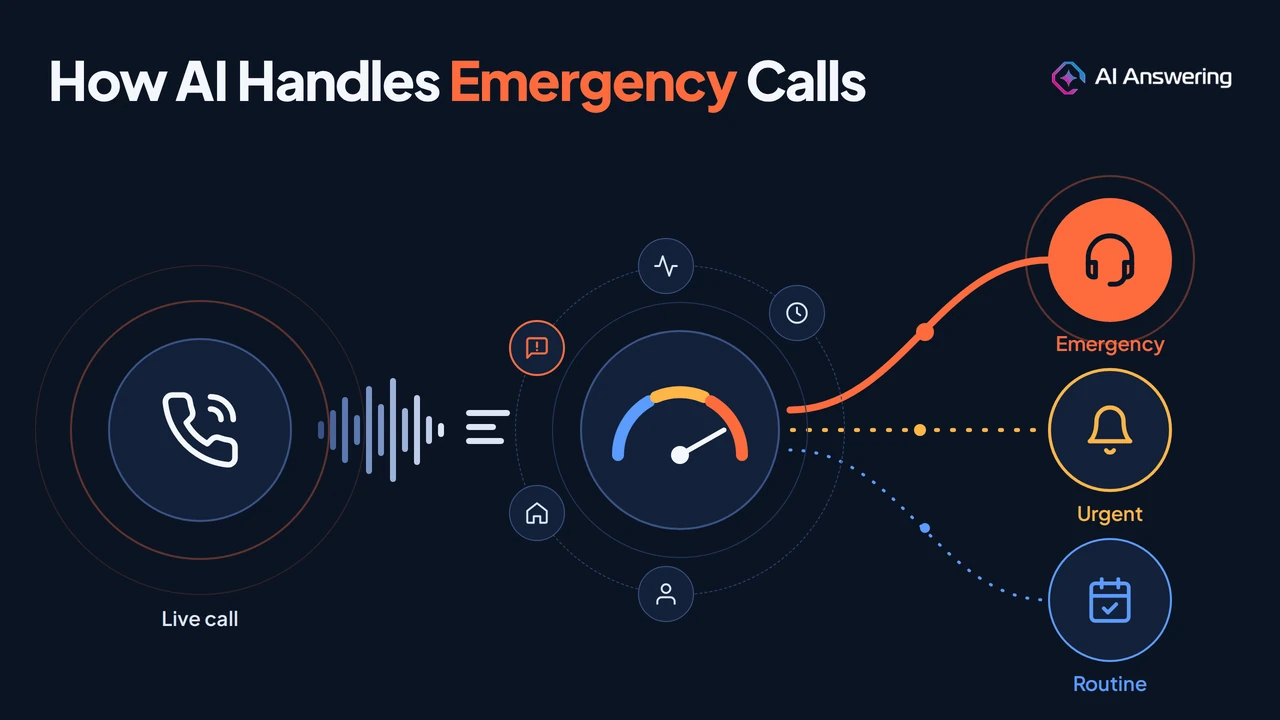
In short: AI answering services handle emergency calls in three moves. They detect urgency mid-call from what the caller says and how they say it, classify the call as emergency, urgent or routine, and act on it: a live warm transfer for emergencies, an alert and fast callback for urgent calls, and booking or a message for routine ones. Life-threatening situations get an instruction to call 911.
Below, we walk through each step, what happens if nobody answers, how to test your setup, and the safeguards that keep it safe.
What does it take to handle an urgent call well?
Handling an urgent call well starts with deciding how fast it needs a human. Every call gets answered, but not every call is treated the same.
Message-taking and phone menus treat a gas leak like a billing question. An AI call center handling hundreds of calls can't afford that.
Instead, the AI listens to the conversation and does three things:
- Detects time-sensitive signals, even without the word emergency.
- Classifies the call as emergency, urgent or routine.
- Acts, from a live transfer to booking next week.
The AI doesn't solve the emergency. It recognizes one and gets the caller to the right person fast.
Step 1: How the AI spots an urgent call
AI call triage happens in seconds, while the caller is still talking. Here is the sequence on a typical call:
- Speech becomes text. Speech recognition converts the caller's words into a live transcript the AI can reason over.
- The AI works out intent. Natural language understanding identifies what the caller needs: a new matter, a repair, a refill, a showing, or help right now.
- It weighs urgency signals. No single signal decides. The AI looks at several together:
- Words and phrases, such as flooding, arrested, bleeding or locked out
- Context, such as a hearing tomorrow morning or a newborn in a house with no heat
- Tone, such as speed, stress and repetition in the caller's voice
- Caller history, such as an existing client or a high-value account
- Timing, such as after hours, weekends or a known storm
- It asks clarifying questions. If signals are mixed, the AI asks what a good receptionist would: Is water still coming in? Is anyone hurt? When is the hearing?
- It assigns an urgency level. The call lands in one of the tiers you define, using your customizable call routing rules.
- It acts. Emergencies go to a live person now. Urgent calls are flagged for a fast callback. Routine calls are booked or logged.
Combining signals into a score is an established approach. One patent on urgency-scoring methods describes scores built from inputs such as voice volume, caller history and agent assessments, compared across callers.
Keywords vs meaning: why word lists miss silent emergencies
Many urgent calls never include the word emergency. Callers describe what they see, not the category it belongs to:
- “There's water coming through the kitchen ceiling.”
- “They just took my son to the station.”
- “The swelling has spread up to my eye since this morning.”
A system that only matches a keyword list can treat all three as routine messages. That is why AI Answering reads meaning and context, and asks a follow-up question when a description sounds serious but does not match a rule.
Step 2: How calls are sorted into urgency tiers
Good call prioritization starts with three clear tiers, each tied to one action. Your AI answering service applies them on every call, day or night.
The exact examples change by industry. The structure does not. Every call type you handle should map to one tier and one owner before you go live.
Step 3: What happens after a call is flagged urgent
Detection is only half the job. Urgent call escalation is where callers decide whether your business came through for them.
1. A warm transfer, not a cold one. With a warm transfer, the AI briefs your team member before connecting the caller: who is calling, what happened, where, and what has been said so far. The caller does not start over. AI Answering is built to escalate to a live agent with full call context for exactly this reason.
2. A chain, not a single phone. One on-call number is a single point of failure. Set a sequence instead: primary on-call, then backup, then manager. This mirrors standard on-call escalation policies used by operations teams, where each level has a set time to respond before the next is tried.
3. Alerts in parallel. While the transfer rings, send an SMS and email with the caller's name, number, address, urgency level and a short summary. If someone is driving or in a meeting, they still see it.
4. A fallback if nobody answers. If the whole chain is missed, the AI should stay with the caller, collect every detail, tell them honestly what happens next and when, and send a high-priority alert. A caller who hears a clear plan is far less likely to hang up and dial a competitor.
5. A record of everything. Each escalation should be logged with a transcript, recording and outcome. That gives you an audit trail and shows where your rules need tuning.
How to set up and test emergency call handling
The best time to find a gap in how your AI answering service handles emergency calls is before launch, on a test call. Use this six-step process:
- Pull 90 days of calls. Listen to recordings or read voicemails and notes. Sort them into emergency, urgent and routine.
- Write red flags in callers' words. Use the phrases people actually said, not your internal terms. Callers say water everywhere, not active leak.
- Assign every call type a tier and an owner. Decide who gets emergencies by day, at night and on weekends.
- Build the escalation chain and fallback. Set the order of people to try, how long each phone rings, and what the AI does if nobody answers.
- Run scripted test calls. Include clear emergencies, silent emergencies with no trigger words, false alarms that sound urgent but are not, after-hours calls and, if you serve them, Spanish-speaking callers. AI Answering supports English and Spanish.
- Review transcripts weekly for 30 days. Check every escalation and a sample of routine calls. Add phrases you missed and remove rules that cause false alarms.
What good looks like. Use these targets when you review your test calls and first 30 days of live calls. If you miss one, tighten or loosen the matching rule.
Why emergency call handling fails, and how to fix it
When an urgent call slips through, the cause is almost always setup, not the technology. Here are the six most common failure points:
- Keyword-only rules. “Water through the ceiling” gets logged as a routine message. Fix: pair keywords with context and a follow-up question.
- One on-call number. The phone is on silent and the emergency becomes a voicemail. Fix: build a primary, backup and manager chain with SMS alerts.
- Escalating everything. Staff get woken for routine calls and start ignoring alerts. Fix: keep the emergency tier tight and move borderline cases to urgent.
- AI giving advice. The caller gets medical or legal guidance from a machine. Fix: limit the AI to recognize, collect and connect.
- Silent hand-offs. The caller hangs up unsure if anyone is coming. Fix: always say who will call back, and roughly when.
- No call reviews. Rules drift as services, staff and seasons change. Fix: review escalations weekly for a month, then monthly.
Is it safe to let AI answer emergency calls?
It is, when it is designed to support people rather than replace them. Four safeguards matter most:
- Humans make the call on emergencies. The AI recognizes and routes; your staff decide and act. This kind of human oversight and ongoing testing is central to the NIST AI Risk Management Framework.
- Clear 911 boundaries. Life-threatening situations get an immediate instruction to call 911, not a transfer queue.
- Health information is protected. Practices that share patient information with an answering vendor generally need a business associate agreement under HIPAA business associate rules.
- Security is independently checked. AI Answering maintains SOC 2 Type II and HIPAA compliance, with call recordings and transcripts handled under those controls.
Call recording laws vary by state, so include a recording notice in your greeting and confirm requirements with your own counsel.
Frequently Asked Questions
Never let an emergency become a voicemail
Every business gets calls that cannot wait. The difference is whether your phone system can tell which ones they are. AI Answering answers every call, detects urgency in real time and escalates emergencies to your team with full context, while routine calls are booked and logged automatically.
See how AI Answering routes urgent calls or start your free trial.