
CRM call center software connects every phone conversation to the customer record. The person (or AI) answering already knows who is calling, what they need, and what happened last time.
For a law firm, dental practice, or home services company, that link decides whether a call becomes a booked appointment or a lost lead.
This guide explains how CRM call center software works, which features matter, and where AI voice agents now fit. It ends with a security checklist and seven questions to ask any vendor.
What is CRM call center software?
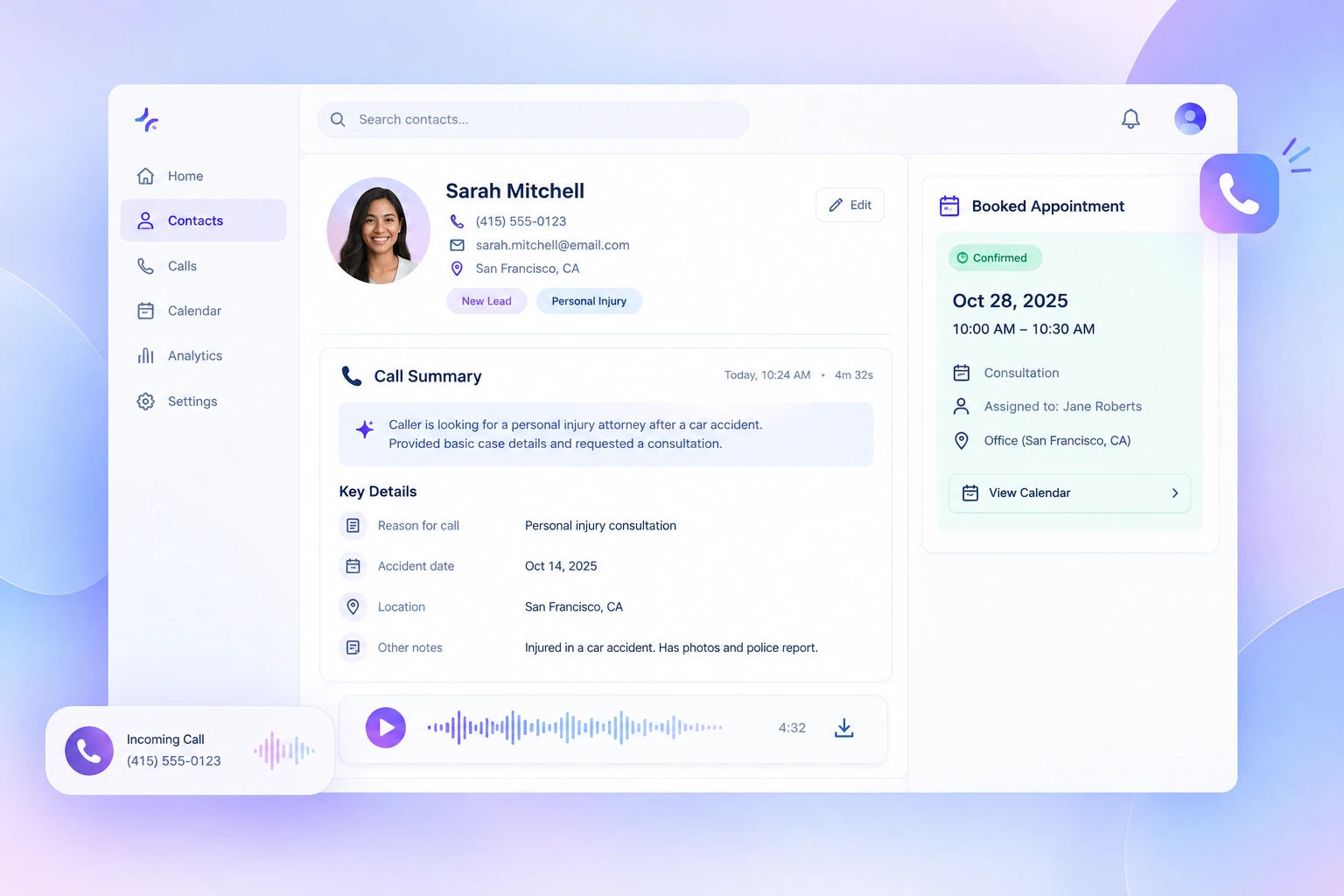
CRM call center software is a system that links your phone line to your customer relationship management (CRM) platform. It identifies callers, routes them, logs every conversation to the right contact record, and triggers follow-ups automatically. The result is one shared history of each customer, whether a person or an AI agent took the call.
A call center CRM focuses on phone calls. A contact center CRM adds chat, email, SMS, and social channels. Most small businesses still get their highest-value leads by phone, so the call workflow is the place to start.
How CRM call center software works
Every call follows the same lifecycle. Good software handles each step without anyone switching tabs or retyping notes.
- The phone rings. The system answers instantly, day or night, so no caller hits voicemail during busy hours or after closing.
- The caller is identified. The number is matched to an existing CRM contact. New callers get a fresh record. With computer telephony integration (CTI), the matched profile appears on screen as a "screen pop."
- The call is routed. Rules send the caller to the right place based on caller type, urgency, language, or time of day. An existing client with an emergency reaches a person; a new inquiry goes to intake.
- The conversation is handled. A human or AI agent answers questions, collects intake details, and books an appointment against live calendar availability.
- Everything is logged. The transcript, recording, summary, and structured details are written to the CRM record automatically.
- Follow-ups fire. Confirmations and reminders go out by SMS or email, and the team is notified of anything that needs a human.
The key word is automatically. If an agent has to copy notes into the CRM after each call, data goes missing and leads slip through.
Why is CRM important to call centers?
Without a CRM, every call starts from zero: the agent doesn't know who is calling, what they need, or what was promised last time. A CRM gives each call that context and keeps a record of what happened, so nothing depends on memory or sticky notes. For small teams, that's often the difference between a booked job and a caller who tries the next business.
Typical benefits include:
- Faster, more personal calls. Agents see the caller's name, history, and open issues the moment the phone rings.
- Fewer lost leads. Every inquiry is logged, assigned, and followed up, including after-hours calls.
- Less manual data entry. Call details, notes, and outcomes are written to the record automatically.
- Consistent service across the team. Anyone who picks up an account sees the same history.
- Clearer reporting. Call volume, booking rates, and lead sources come from real data instead of guesswork.
- Reliable follow-up. Reminders, confirmations, and callbacks trigger from the record, so nothing slips.
Key features in CRM call center software
Feature lists run long. These six carry most of the value for a small or mid-sized team.
CRM integration with two-way sync
The phone system should read from your CRM (to recognize callers and see history) and write back to it (to log calls and update records). One-way logging is not enough. Check whether the integration is native, runs through an API, or depends on a third-party connector, because each affects reliability. See which systems we connect to on our CRM integrations page.
Intelligent call routing
Routing should follow business rules you define: caller type, urgency, practice area, location, or language. A good setup keeps emergencies with people and lets routine requests flow to automation.
AI voice agents and 24/7 answering
AI voice agents answer every call instantly, speak naturally, and handle routine requests end to end. They cover nights, weekends, lunch breaks, and call spikes without overtime or extra headcount.
Scheduling with real-time calendar sync
Booking should check live availability and write the appointment to your calendar and CRM in the same step. Reminders then go out automatically, which helps reduce no-shows.
Transcripts, recordings, and summaries
Every call should produce a searchable transcript, a recording, and a short summary attached to the contact. Summaries save the next person from listening to a ten-minute call to find one detail.
Reporting and dashboards
Managers need call volume, after-hours share, booking rate, escalation rate, and response time in one view. These metrics show where leads are won or lost.
5 Best CRM Call Center Softwares in 2026
The right pick depends on two things: the CRM you already use, and whether you need AI to answer calls or just help your agents. Here are five strong options, from AI-first answering to full contact center platforms.
How we chose these tools: We compared each platform on six criteria: CRM integration depth, AI call handling, 24/7 coverage, routing and escalation control, security and compliance, and fit for small and mid-sized teams. We reviewed vendor documentation and 2026 product announcements for each tool. AI Answering is our own product; we've included it alongside the others so you can compare them side by side.
1. AI Answering
AI Answering is built for small and mid-sized businesses that want every call answered, day or night, without hiring more staff. Its AI voice agents handle routine calls end to end, book appointments, and log everything to your existing systems. Complex calls go to your team with the full context attached. It's a strong fit for law firms, healthcare and dental practices, home services, and real estate.
Key features:
- AI voice agents that answer 100% of inbound calls 24/7 and make outbound follow-up calls
- Appointment booking with real-time calendar sync, plus SMS and email confirmations
- Smart routing and escalation to live staff with full call context
- Call transcripts, recordings, and AI summaries logged to your CRM
- SOC 2 Type II certified and built to HIPAA standards, with BAAs available
2. Salesforce Agentforce Contact Center
Salesforce launched Agentforce Contact Center in March 2026 as a CRM-native contact center. It brings voice, digital channels, CRM data, and AI agents into one platform, and it's sold as an add-on to Agentforce Service (formerly Service Cloud). It suits mid-sized and enterprise teams already running on Salesforce.
Key features:
- Native voice built into Salesforce, with no separate telephony integration
- AI agents that handle self-service across voice and digital channels
- Agents work from the full Salesforce customer record on every call
- Workforce engagement management, including workforce and quality management
- Option to keep an existing contact center platform through integrations instead
3. HubSpot Service Hub
HubSpot Service Hub combines a help desk with HubSpot's Smart CRM, so every call, ticket, and chat sits on the same contact record. Calling is built into the help desk workspace, which makes it a natural choice for teams already using HubSpot for marketing or sales.
Key features:
- Help Desk Workspace that unifies phone, email, live chat, and social conversations
- Built-in calling, with calls logged automatically to the contact record
- Breeze Customer Agent for AI self-service on chat and email
- AI conversation summaries to get reps up to speed fast
- SLA management and ticket routing on Professional plans and up
4. Aircall
Aircall is a cloud phone system for sales and support teams that live in their CRM. It's known for integrations, with more than 250 apps including Salesforce, HubSpot, and Pipedrive, and Software Advice named it Best for Integrations in its 2026 call center software report.
Key features:
- 250+ native integrations with automatic call logging
- AI voice agents that qualify leads and resolve routine calls around the clock
- AI transcription, call summaries, and real-time coaching
- Power dialer for outbound-heavy teams
- Calls, SMS, and WhatsApp in one shared workspace
5. Dialpad
Dialpad is an AI-native communications platform that covers business phone, contact center, and meetings. Its AI listens to calls in real time, so agents get live transcripts and suggestions while the call is still happening. It connects with CRMs such as Salesforce, HubSpot, and Zoho.
Key features:
- Real-time transcription and AI-generated call recaps
- Live agent assist with suggested answers during calls
- CRM integrations that log calls and sync contact data
- Sentiment analysis and supervisor dashboards
- Voice and digital channels on one platform
Types of Call Center CRM Software
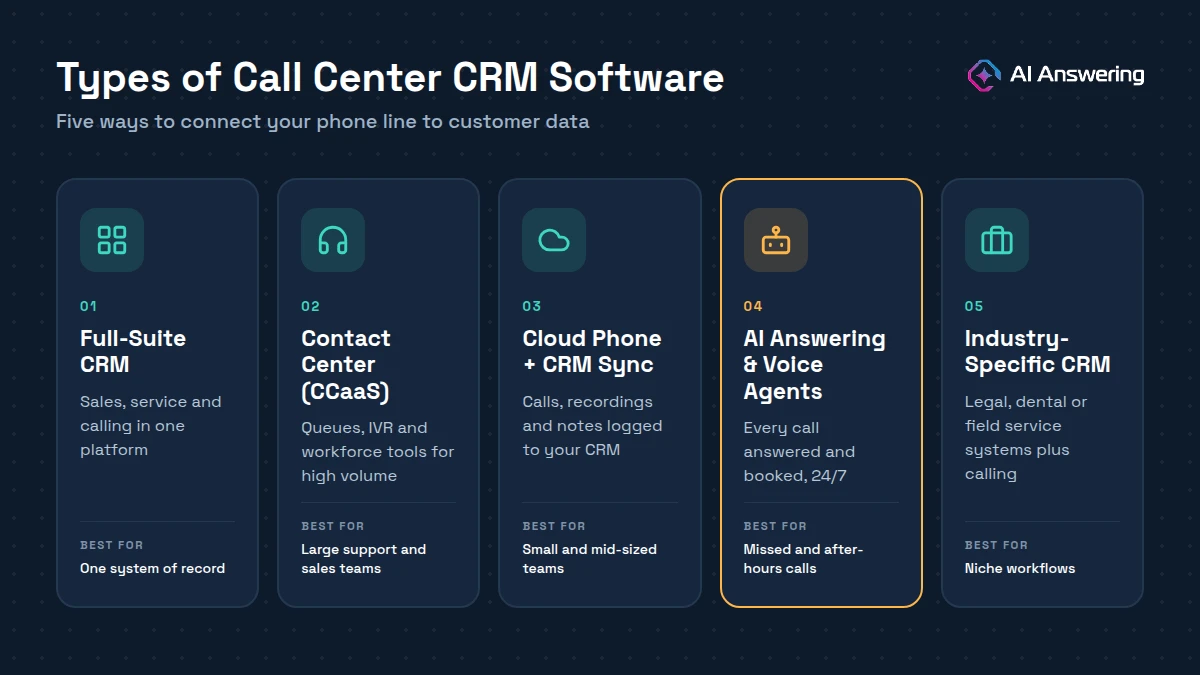
Not every call center CRM works the same way. Some replace your whole customer platform, while others plug into the CRM you already have. Knowing the main types helps you shortlist the right tools faster.
Full-Suite CRM
A full-suite CRM combines contact management, sales, marketing, and customer service with built-in calling in one platform. It suits teams that want a single system of record and are willing to run most of their business inside it.
Contact Center Platforms (CCaaS)
Contact center as a service (CCaaS) platforms are built for high call volumes, with queues, IVR menus, workforce management, and quality monitoring. They connect to your CRM so agents see customer data on every call, which makes them a fit for larger support and sales teams.
CRM-Integrated Cloud Phone Systems
These are business phone systems that run over the internet and sync with popular CRMs to log calls, recordings, and notes automatically. They're a good middle ground for small and mid-sized teams that want better calling without replacing their CRM.
AI Answering and Voice Agent Platforms
AI answering platforms use voice agents to pick up every call, handle routine requests, book appointments, and write the details back to your CRM. They're ideal for businesses that miss calls after hours or during busy periods and want 24/7 coverage without adding staff.
Industry-Specific CRMs
These CRMs are built for one industry, such as practice management software for law firms, patient management systems for dental and healthcare practices, or field service software for home services. Pairing one with a call platform keeps calls tied to the cases, patients, or jobs your team already tracks.
Security and compliance checklist
Your call system stores names, phone numbers, and often health or legal details. Treat it like any other system that holds sensitive data.
- SOC 2 Type II report. Ask for the vendor's current report. It shows an independent auditor tested their security controls over time.
- HIPAA and a business associate agreement. If you are a healthcare provider, a vendor that handles patient information on your behalf is a business associate under HIPAA. Confirm the vendor will sign a business associate agreement before any patient calls flow through it.
- Consent for AI-voiced outbound calls. In February 2024, the FCC confirmed that AI-generated voices count as "artificial" voices under the Telephone Consumer Protection Act. Outbound AI calls generally require prior consent, so confirm your consent records before running campaigns.
- Access controls and audit logs. Limit who can hear recordings and see transcripts, and keep a record of who accessed what.
- Data retention. Set how long recordings and transcripts are kept, and make sure the vendor can delete them on request.
AI Answering is SOC 2 Type II certified and built to HIPAA standards, with BAAs available. Details are on our security and HIPAA compliance page. This section is general information, not legal advice; check your obligations with counsel.
Tips for Choosing the Best CRM Call Center Software
Use these tips to compare vendors on what actually affects your calls, not just the feature list.
Start with the CRM you already use
Check whether the tool integrates natively with your CRM, practice management, or field service system. A native, two-way integration is more reliable than one that depends on a third-party connector.
Check what gets written back to the CRM
Some tools only attach a recording. Look for one that writes structured details such as caller type, reason for call, and outcome, so you can report on them later.
Make sure every call gets answered
Ask how the system handles nights, weekends, and call spikes. If after-hours calls still go to voicemail, you'll keep losing leads.
Look for routing you can control
You should be able to set routing and escalation rules yourself, without a developer. That lets you adjust quickly as your team or call volume changes.
Confirm real-time calendar booking
The tool should book into your actual calendar with live availability. Double bookings and manual confirmations cancel out the time you save.
Verify security and compliance
Ask for a current SOC 2 Type II report. If you handle patient data, confirm the vendor will sign a business associate agreement before any calls flow through it.
Compare setup time and total cost
Ask how long setup takes and what the price includes, such as minutes, users, integrations, and support. A low base price can hide costly add-ons.
Test it with real scenarios
Run a live test call using your own scripts, including a messy one: an angry caller, a wrong number, or a request outside your services. How the tool handles edge cases tells you more than a demo.
Common mistakes to avoid
Even good software won't help if it's set up the wrong way. These are the mistakes we see most often when businesses connect their phones to a CRM:
- Buying a phone system that only logs call times. Without intake details and outcomes in the CRM, you cannot measure or improve conversion.
- Leaving after-hours calls to voicemail. Many callers will not leave a message; they call the next business on the list.
- Automating without an escalation path. Every AI workflow needs a clear route to a person, with context passed along.
- Skipping the compliance paperwork. Healthcare providers need a BAA in place before patient calls flow through any vendor.
- Never reviewing call summaries. Read a sample each week to refine scripts, routing rules, and FAQs.
Frequently Asked Questions
Turn every call into a CRM record
AI Answering picks up every call 24/7, collects intake, books appointments, and logs it all to the systems you already use, so your CRM stays complete without extra admin. Explore our CRM integrations or book a demo to hear an AI voice agent handle your calls.